Full documentation: ML training, datasets, hyperparameters, accuracy, honeypot operation, project run, simulation, model artifacts (PKL/JSON), and dashboard screenshots.
The project deploys an advanced hybrid honeypot: one process provides real SSH (via Paramiko) on port 2222 and Telnet on port 2323. SSH supports full key exchange and password auth, a persistent host key (data/honeypot_keys/), an interactive shell with a virtual filesystem (ls, cd, cat, pwd, whoami, id, uname, etc.), and single-command exec (e.g. ssh user@host "cat /etc/passwd"). Telnet presents an Ubuntu-style login prompt and captures credentials. Every connection is logged as soon as it is accepted; a queue-based writer thread ensures logs are not dropped under high load (e.g. DDoS). All events go to data/honeypot_logs.jsonl. The implementation is split into multiple modules (config, filesystem, logger, SSH/Telnet handlers) for maintainability.
Every honeypot event is mapped to one or more MITRE ATT&CK technique IDs. The mapping is implemented in attack_mapping/mitre_map.py and attack_mapping/map_events.py. Examples: login_attempt / brute_force → T1110.001 (Password Guessing); connection / raw_input → T1595.002; command → T1059.004, T1021.001; DDoS → T1498. The export script applies this mapping so the dashboard and any downstream dataset use technique IDs.
A React dashboard in dashboard/ provides the threat intelligence UI. It loads event data from dashboard/public/events.json (generated by scripts/export_events_for_dashboard.py from honeypot logs). The dashboard shows: Overview (KPIs, honeypot attacks bar, attacks histogram, attack map, time series by service/event type, donuts), Threat Events table, Geo Map, Analytics (events over time, by service), Top IPs, and ATT&CK Matrix (technique badges). All views use real data only (no mock data).
The reusable dataset consists of (1) cleaned IDS data in data/ (e.g. unsw_nb15_cleaned.parquet, cic_ids2018_cleaned.parquet) produced by the data-cleaning notebook, and (2) honeypot-derived events with ATT&CK technique IDs. The latter is the same data as events.json; the source log is data/honeypot_logs.jsonl. Exported events can be used for research, ML, or sharing TTPs.
Validation is done in two ways: (1) ML validation and test metrics from ml/train.py (accuracy, precision, recall, F1 on a held-out test set; validation vs test bar chart saved under models/). (2) Honeypot/attack simulation: run python scripts/simulate_ddos_honeypot.py against localhost to generate many connections; then run the export script and refresh the dashboard to confirm events and ATT&CK mapping appear correctly.
Training is implemented in ml/train.py. The script:
datasets/ or cleaned from data/).X and labels y (multi-class from attack_cat or Label; binary from label if used).HARDER_MODE=1 (see Special codes).StandardScaler on training data and scales train/val/test.models/.Priority order:
| Source | Path | Target column | Notes |
|---|---|---|---|
| UNSW-NB15 (raw) | datasets/UNSW-NB15/UNSW_NB15_training-set.csv, UNSW_NB15_testing-set.csv | attack_cat | Train and test files are concatenated then split again; id is dropped. |
| CIC-IDS2018 (raw) | datasets/CSE-CIC-IDS2018/cic.csv | Label | First 200,000 rows; Timestamp, Flow Duration dropped. |
| CIC-IDS2018 (cleaned) | data/cic_ids2018_cleaned.parquet | Label | Fallback if raw not found. |
| UNSW-NB15 (cleaned) | data/unsw_nb15_cleaned.parquet | attack_cat | Fallback if raw not found. |
If the combined UNSW data has more than 200,000 rows, a stratified sample of 200,000 is used for training.
| Parameter | Value | Role |
|---|---|---|
max_depth | 4 | Tree depth to limit overfitting. |
eta | 0.05 | Learning rate. |
subsample | 0.6 | Row subsample ratio per tree. |
colsample_bytree | 0.6 | Column subsample per tree. |
reg_alpha | 2.0 | L1 regularization. |
reg_lambda | 5.0 | L2 regularization. |
min_child_weight | 5 | Minimum sum of instance weight in a child. |
num_boost_round | 100 | Number of boosting rounds. |
objective | multi:softmax / binary:logistic | Depending on number of classes. |
eval_metric | mlogloss / error | For multi-class / binary. |
After training, the script prints validation and test metrics (accuracy, precision, recall, F1). Test metrics are computed on the held-out 20% and are the main measure of performance. Reported results (UNSW-NB15 raw, Train: 128000, Val: 32000, Test: 40000):
XGBoost Test Results (Held-out):
  Accuracy:  0.8057
  Precision: 0.6887
  Recall:    0.4481
  F1 Score:  0.4547
| Class | Precision | Recall | F1-score | Support |
|---|---|---|---|---|
| Analysis | 1.00 | 0.02 | 0.03 | 413 |
| Backdoor | 0.83 | 0.04 | 0.08 | 363 |
| DoS | 0.43 | 0.01 | 0.03 | 2554 |
| Exploits | 0.58 | 0.93 | 0.72 | 6909 |
| Fuzzers | 0.66 | 0.41 | 0.51 | 3768 |
| Generic | 1.00 | 0.97 | 0.99 | 9117 |
| Normal | 0.87 | 0.94 | 0.90 | 14432 |
| Reconnaissance | 0.87 | 0.78 | 0.82 | 2181 |
| Shellcode | 0.64 | 0.38 | 0.47 | 234 |
| Worms | 0.00 | 0.00 | 0.00 | 29 |
| accuracy | 0.81 | 40000 | ||
| macro avg | 0.69 | 0.45 | 0.45 | 40000 |
| weighted avg | 0.80 | 0.81 | 0.77 | 40000 |
Validation metrics over iterations are stored in models/training_history.json. During training the script also saves the following graphs to models/; copies are included in doc/ for documentation.
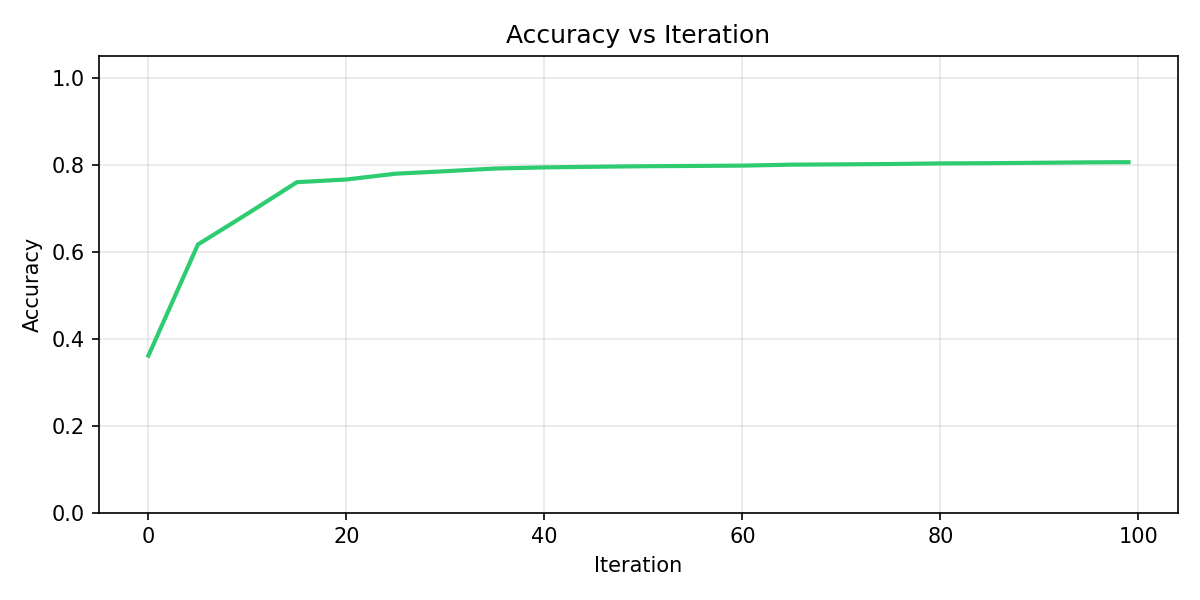
This graph plots validation accuracy (y-axis) against iteration (x-axis, 0–100). Accuracy starts low (around 0.35), rises quickly in the first ~20 iterations (to about 0.77–0.80), then stabilizes. The plateau indicates the model has converged; extra iterations beyond ~40 give little gain. It shows how many rounds are needed for stable performance and helps decide whether to reduce or increase num_boost_round.
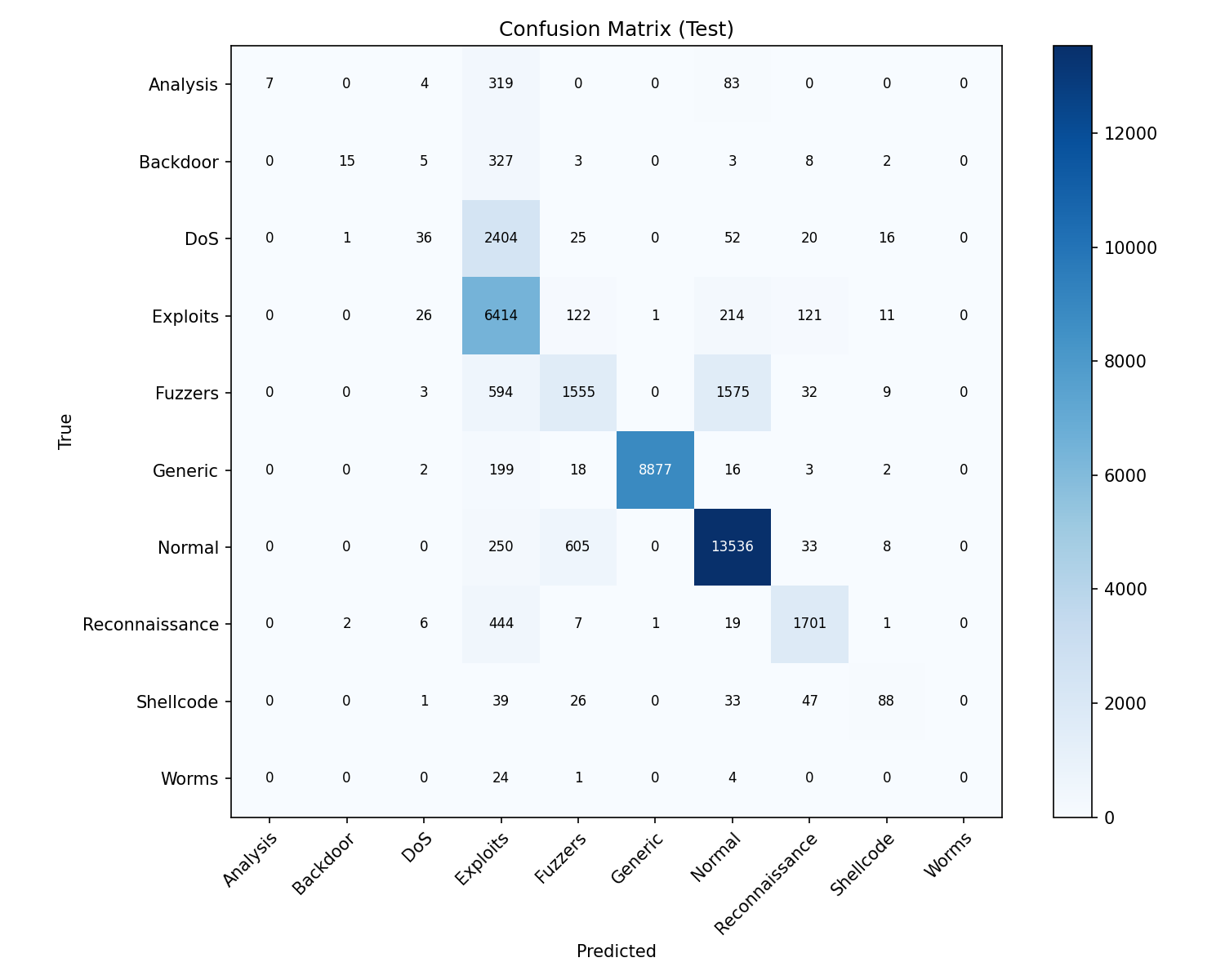
The confusion matrix compares true labels (y-axis) with predicted labels (x-axis) on the held-out test set. Each cell (i, j) is the count of samples that are truly class i but predicted as class j. The diagonal (true class = predicted class) are correct predictions; off-diagonal cells are errors. Darker blue means higher count. From this we see: Generic and Normal have many correct predictions; Exploits are well detected; Analysis, Backdoor, DoS, and Worms are often missed or confused with Exploits; Fuzzers are sometimes confused with Normal. This pinpoints which classes need more data or feature work.
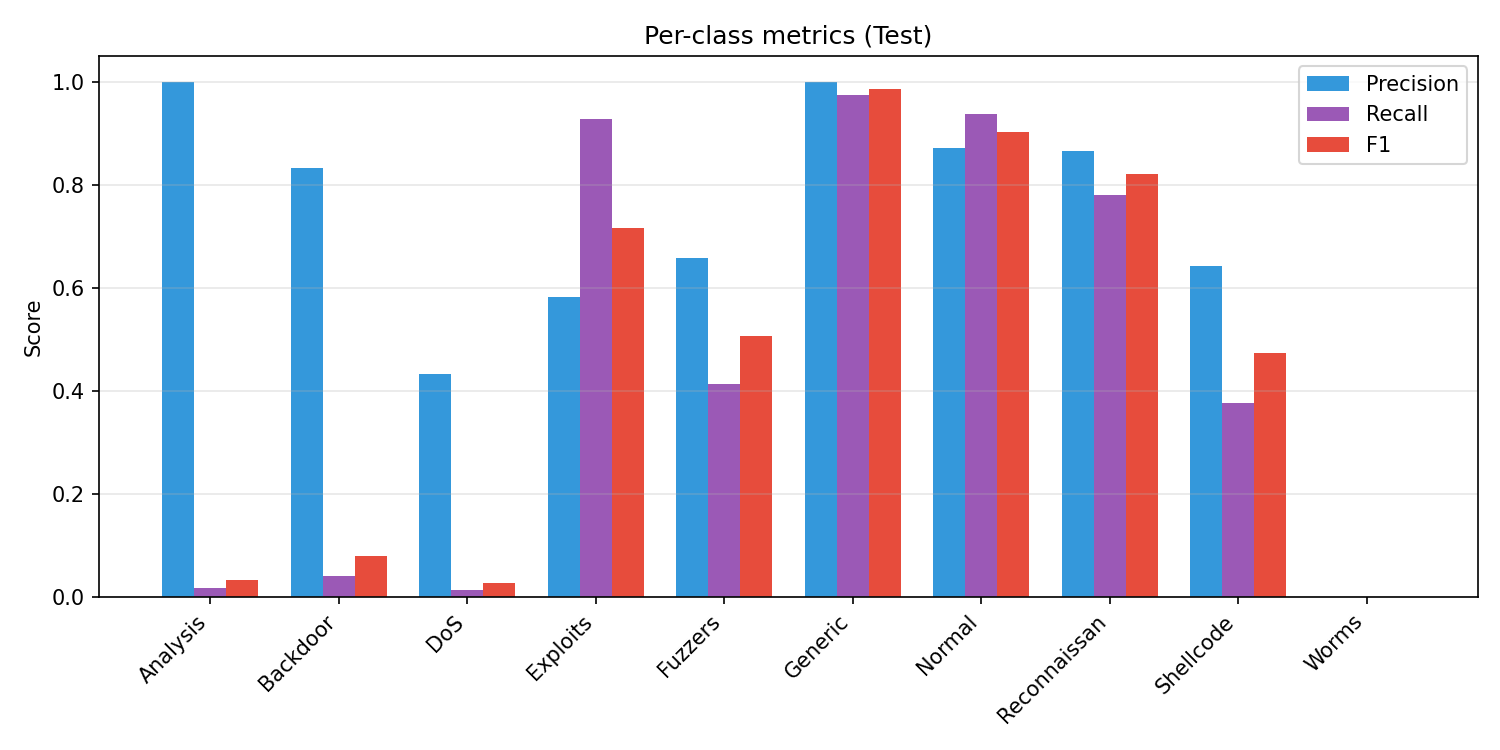
This bar chart shows Precision (blue), Recall (purple), and F1 score (red) for each attack class on the test set. Generic and Normal have high scores across all three; Exploits and Reconnaissance are solid. Analysis, Backdoor, DoS, and Worms have very low recall (the model misses most of these), and Worms has zero precision/recall/F1. High precision with low recall (e.g. Analysis, Backdoor) means the model is right when it predicts that class but rarely predicts it. This graph complements the confusion matrix by summarizing per-class performance in one view.
tree_method='hist', and supports strong regularization to reduce overfitting. Performs well on tabular IDS data.n_neighbors=20, contamination=0.05.All artifacts are saved under models/.
| File | What it is | How it is produced |
|---|---|---|
scaler.pkl | sklearn StandardScaler fitted on training features. | ml/train.py fits it on X_train and pickles it. Used to scale inputs at inference. |
lof.pkl | sklearn LocalOutlierFactor fitted on scaled training data. | ml/train.py fits it on X_train_s (scaler-transformed) and pickles it. Used in predict.py to compute anomaly scores. |
xgboost_model.json | XGBoost Booster (tree model) in JSON format. | clf.save_model(...) in ml/train.py. Used for classification in predict.py. |
feature_names.json | List of feature column names in the same order as training. | Written by ml/train.py. Required at inference to select and order columns. |
class_names.json | List of class labels (e.g. Normal, Generic, DoS) in index order. | Written by ml/train.py. Used to map predicted class indices to names in predict.py. |
dataset_used.txt | Name of the dataset used for the last training run (e.g. CIC-IDS2018, UNSW-NB15-Raw). | Written by ml/train.py for reference. |
training_history.json | Per-iteration validation accuracy, precision, recall, F1. | Written by ml/train.py for plotting and inspection. |
Inference: ml/predict.py loads these artifacts via load_artifacts(), then predict(X) returns label, anomaly, and optionally class (class names for multi-class).
The honeypot is split into modules under honeypot/:
| File | Role |
|---|---|
config.py | Host, ports (2222, 2323), log path, host key path (data/honeypot_keys/ssh_host_rsa_key), timeouts, listen backlog. |
filesystem.py | Virtual filesystem: directory tree (/, /root, /etc, /var/log, /proc, etc.), file contents (passwd, shadow, /proc/cpuinfo, auth.log, etc.), and VirtualFilesystem with handle_command() for shell commands. |
logger.py | Queue-based log_event(): events are enqueued and a single daemon thread appends to data/honeypot_logs.jsonl. Reduces file contention and log loss under DDoS. |
ssh_handler.py | Paramiko-based SSH server: SSHServer (auth, channel, PTY), persistent host key load/generate, interactive shell loop and exec-channel handling using VirtualFilesystem. |
telnet_handler.py | Telnet login sequence: banner, login/password prompts, credential capture, then “Login incorrect”. |
server.py | Entry point: binds SSH and Telnet sockets, logs each connection immediately on accept, spawns a thread per connection. |
data/honeypot_keys/ssh_host_rsa_key; generated once, reused so clients can accept the key once.root@server:/root#; supports ls, cd, pwd, cat, head, tail, whoami, id, uname (-a/-r), wget/curl (simulated “connection refused”), help, exit. Other commands return “command not found”.ssh root@host "cat /etc/passwd") is supported; command and output are handled via the same virtual filesystem.connection (at accept), login_attempt (username/password), command (each shell or exec command).Test from a second terminal: ssh -o StrictHostKeyChecking=accept-new -p 2222 root@localhost (any password).
server login: / Password: prompts.login_attempt, then responds with “Login incorrect”.connection is logged at accept time (same as SSH).event_type: connection and service (ssh/telnet) as soon as it is accepted, before the handler runs. Under connection floods, every connection is still recorded.log_event() pushes a JSON object to an in-memory queue; a single writer thread appends one line per event to data/honeypot_logs.jsonl. This avoids many threads writing to the same file and reduces the risk of dropped or corrupted logs under load.timestamp, source_ip, service, event_type, and optionally username, password, command, raw.python -m venv venv, venv\Scripts\activate, pip install -r requirements.txt. For the dashboard: cd dashboard && npm install.datasets/. Alternatively run notebooks/data_cleaning.ipynb to produce cleaned data in data/.python ml/train.py. Outputs and plots go to models/.python honeypot/server.py. Leave running; logs go to data/honeypot_logs.jsonl. In a second terminal, test SSH: ssh -o StrictHostKeyChecking=accept-new -p 2222 root@localhost (any password).python scripts/export_events_for_dashboard.py. Writes dashboard/public/events.json with ATT&CK-mapped events.cd dashboard && npx vite (or npm run dev). Open the URL shown (e.g. http://localhost:5173). The dashboard fetches /events.json and shows real data only.To generate many connections against your own honeypot (localhost only):
python scripts/simulate_ddos_honeypot.py
Options:
-n 200: number of connection attempts (default 100).-t 20: number of concurrent threads (default 20).--port 2323: target Telnet instead of SSH (2222).--login: send root\n so some events are logged as login_attempt.Example:
python scripts/simulate_ddos_honeypot.py -n 500 -t 50 --login
Then run python scripts/export_events_for_dashboard.py and refresh the dashboard to see the new events. The script only allows 127.0.0.1 or localhost as the target host.
To add sample log lines (e.g. for demo) without running the honeypot: python scripts/add_sample_logs.py. Then export and refresh the dashboard as above.
| Code / Path | Meaning |
|---|---|
HARDER_MODE=1 | Environment variable. When set (default), ml/train.py adds 10% label noise to the training set to simulate imperfect labels and reduce overfitting. Set HARDER_MODE=0 to disable. |
data/honeypot_logs.jsonl | Appended log of honeypot events; one JSON object per line. Source for the dashboard and reusable event dataset. Written by a single queue-based writer thread. |
data/honeypot_keys/ssh_host_rsa_key | Persistent RSA host key for the SSH honeypot. Created on first run; reuse allows clients to accept the key once (StrictHostKeyChecking=accept-new). |
dashboard/public/events.json | ATT&CK-mapped events consumed by the dashboard. Overwritten by scripts/export_events_for_dashboard.py. |
LOKY_MAX_CPU_COUNT=1 | Set in ml/train.py to avoid joblib/loky core-detection issues on some environments; LOF uses n_jobs=1. |
attack_mapping/mitre_map.py | Maps event types and services to MITRE ATT&CK technique IDs (e.g. T1110.001, T1595.002). |
attack_mapping/map_events.py | Applies event_to_techniques to a list of log events and adds mitre_techniques to each. |
notebooks/data_cleaning.ipynb cleans the raw UNSW-NB15 and CSE-CIC-IDS2018 datasets for use in the ML pipeline.
UNSW_NB15_training-set.csv and UNSW_NB15_testing-set.csv from datasets/UNSW-NB15/. Explores dtypes, labels, and attack categories. Fills numeric NaNs with column medians (in a single assignment to avoid chained assignment). Writes data/unsw_nb15_cleaned.parquet and data/unsw_nb15_cleaned.csv.datasets/CSE-CIC-IDS2018/ (e.g. cic.csv). Cleans and normalizes columns, handles labels. Writes data/cic_ids2018_cleaned.parquet and data/cic_ids2018_cleaned.csv.The ML script can use either the raw datasets in datasets/ or these cleaned outputs in data/ (raw is preferred when available to avoid any cleaning-induced bias).
Place screenshots of the dashboard in the doc/ folder. Below is what each main view shows and how it relates to the project.
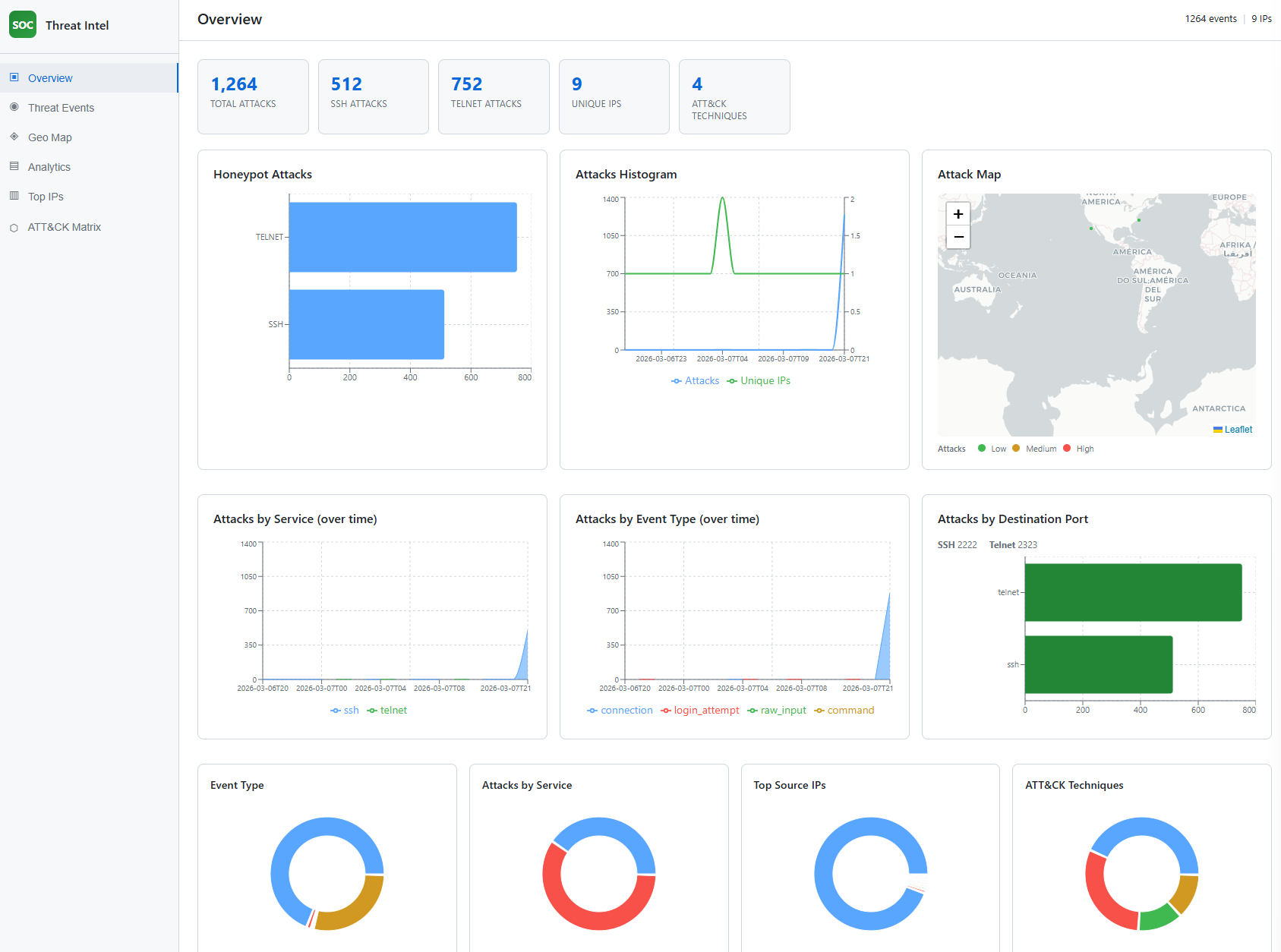
Screenshot: doc/Screenshot 2026-03-08 033031.png (Overview).
The Overview tab shows the SOC Threat Intel dashboard home: summary KPI cards (Total Attacks, SSH Attacks, Telnet Attacks, Unique IPs, ATT&CK Techniques), a bar chart of honeypot attacks by service (SSH vs Telnet), an attacks histogram (attacks and unique IPs over time), an attack map with a Low/Medium/High legend, time series of attacks by service and by event type, a bar chart of attacks by destination port (SSH 2222, Telnet 2323), and four donut charts (Event Type, Attacks by Service, Top Source IPs, ATT&CK Techniques). This view demonstrates the threat intelligence dashboard and the hybrid honeypot deployment (two services, two ports) and how ATT&CK technique counts are surfaced.
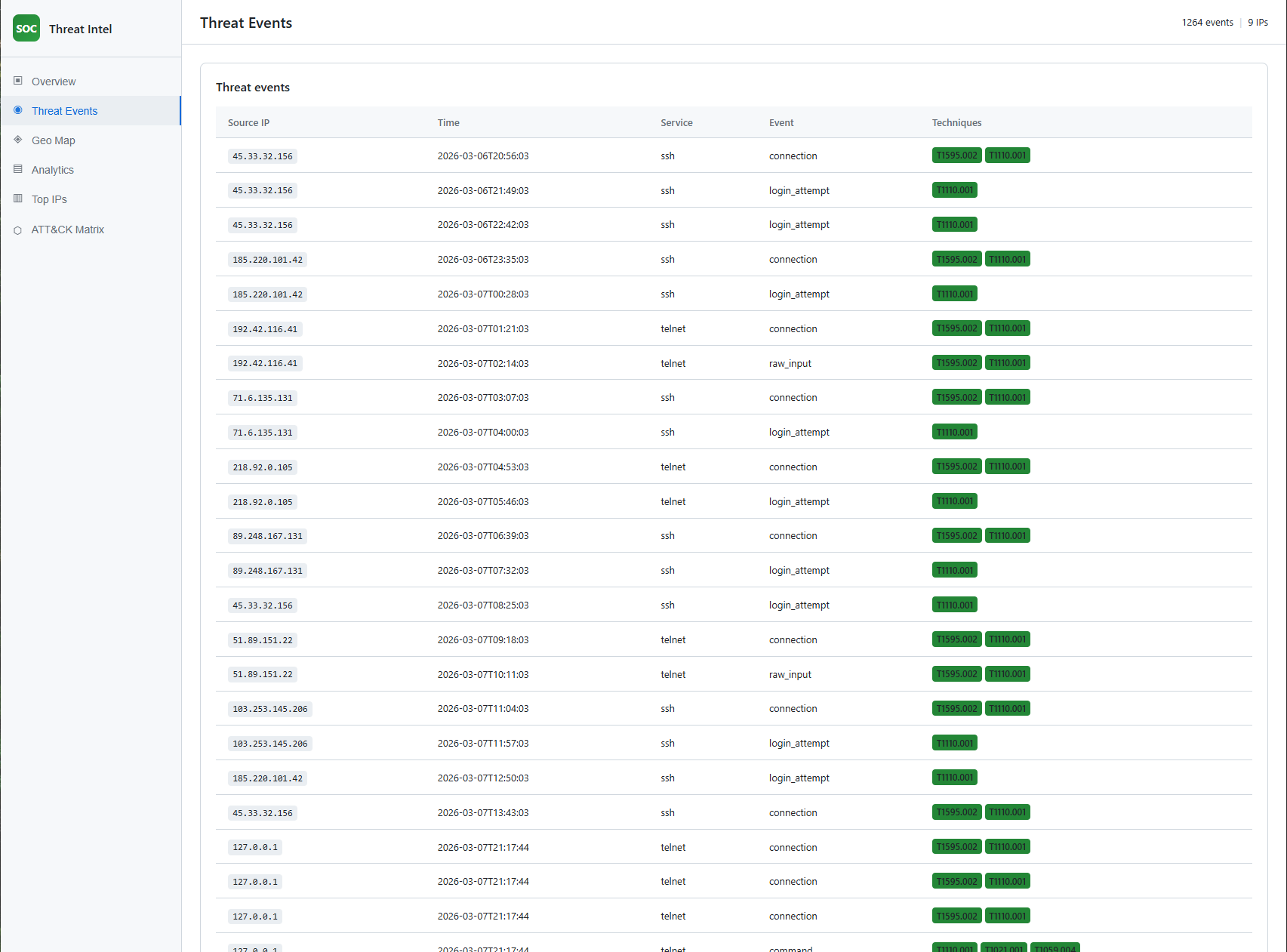
Screenshot: doc/Screenshot 2026-03-08 033041.png (Threat Events).
The Threat Events tab shows a table of individual events: Source IP, Time, Service, Event type, and Techniques (MITRE ATT&CK IDs as badges). This illustrates how each honeypot event is mapped to techniques (MITRE ATT&CK mapping) and how the reusable dataset is structured (each row is an event with technique IDs).
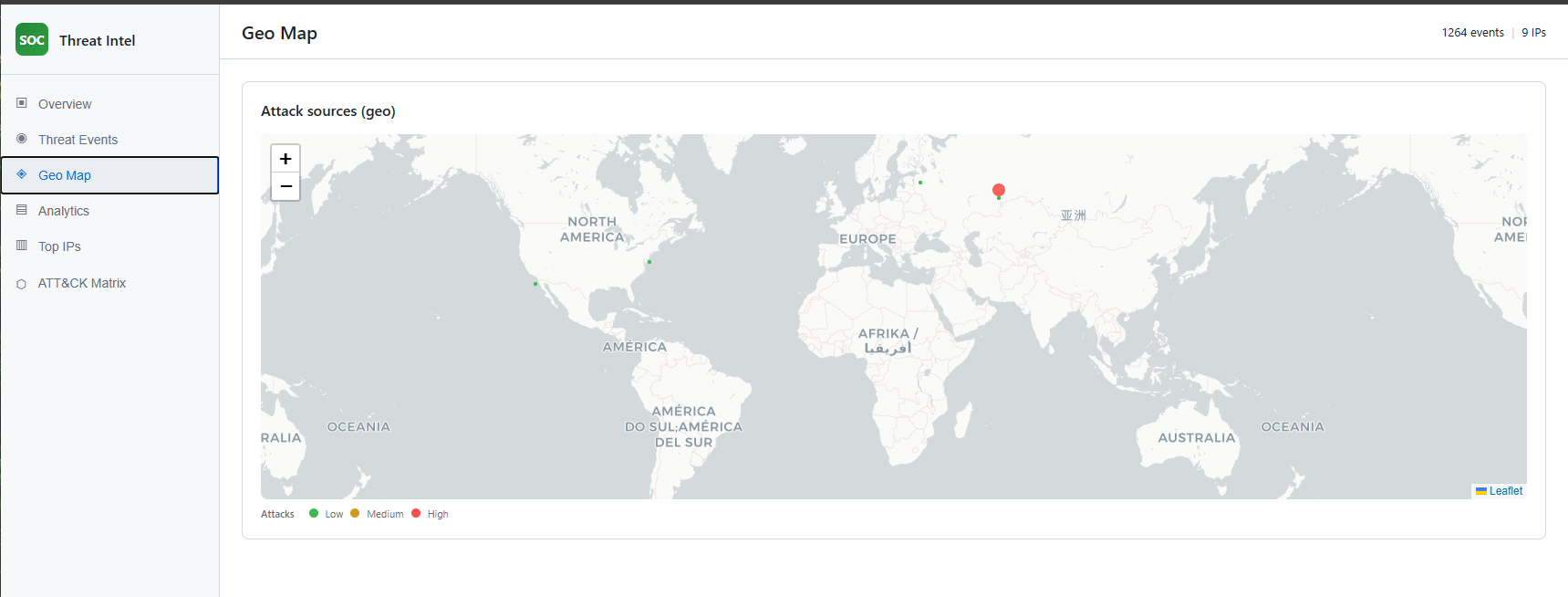
Screenshot: doc/Screenshot 2026-03-08 033118.png (Geo Map).
The Geo Map tab shows a world map with markers for attack sources. Marker size and color indicate intensity (Low / Medium / High). The map uses a light basemap and places IPs into regions (e.g. Russia, US, Sri Lanka) for visualization. This supports the threat intelligence dashboard by providing geographical context for the honeypot data.
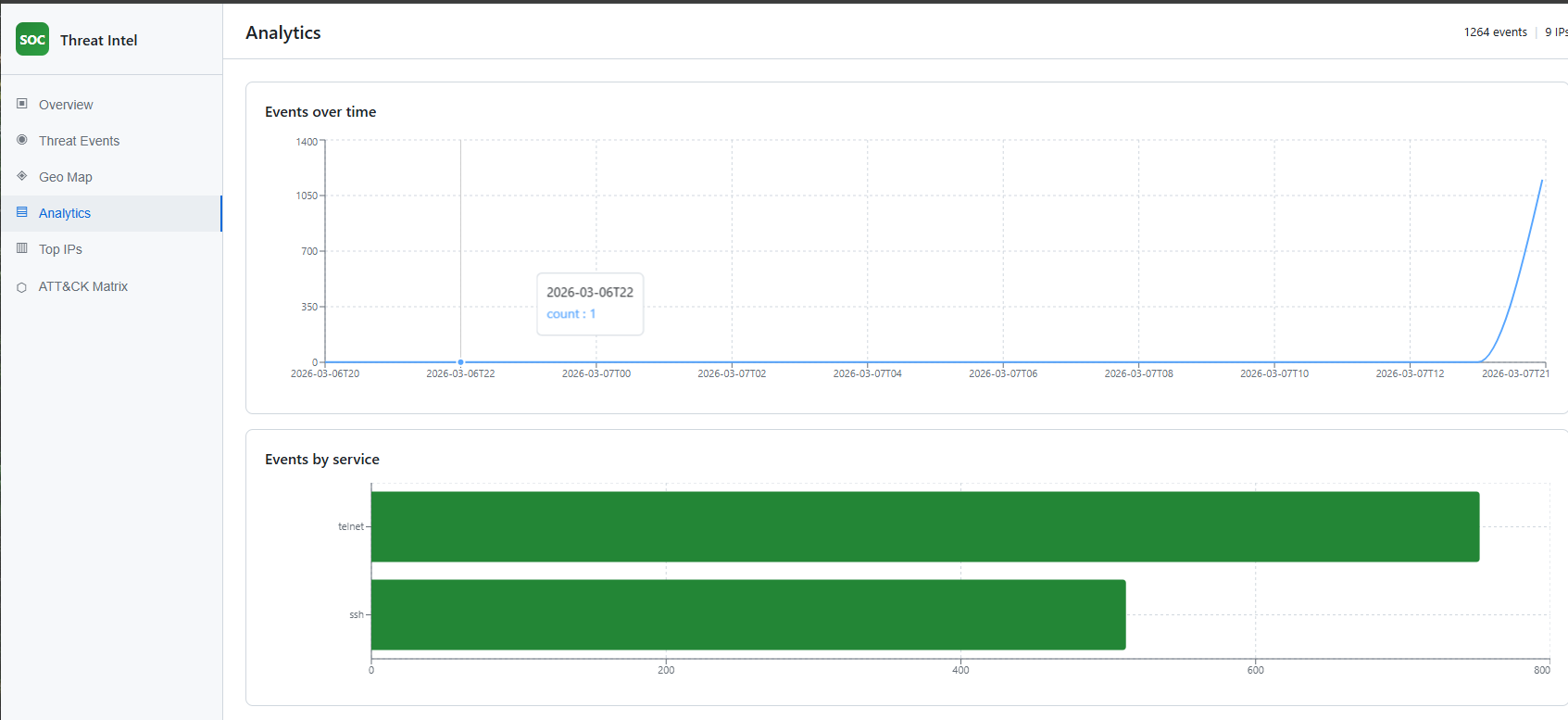
Screenshot: doc/Screenshot 2026-03-08 033048.png (Analytics).
The Analytics tab shows “Events over time” (line chart of event count per hour) and “Events by service” (horizontal bar chart for SSH and Telnet). This demonstrates how the dashboard visualizes trends and service mix from the honeypot, and supports validation by showing that simulated or real traffic appears in the expected time windows and services.
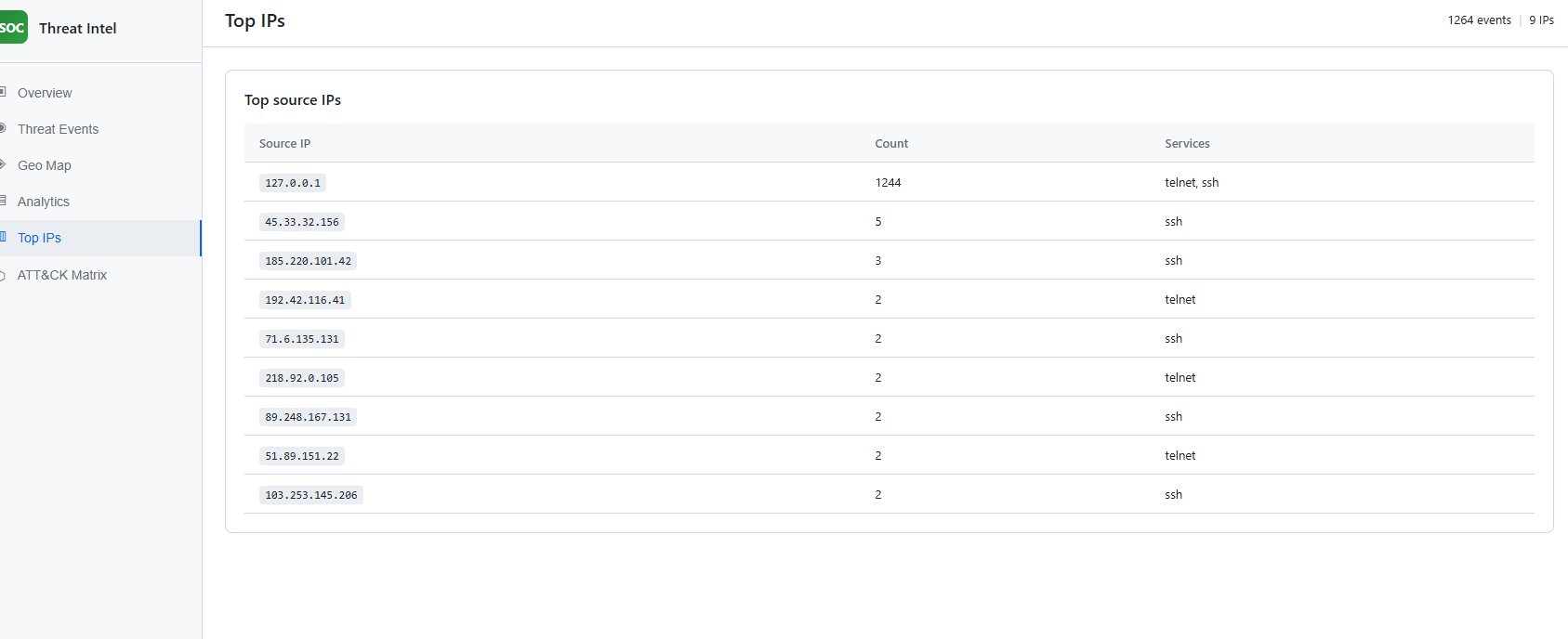
Screenshot: doc/Screenshot 2026-03-08 033130.png (Top IPs).
The Top IPs tab lists the most active source IPs with event count and services (e.g. ssh, telnet). It helps identify which IPs are generating the most traffic to the honeypot. Localhost (127.0.0.1) with a high count typically indicates local simulation runs.
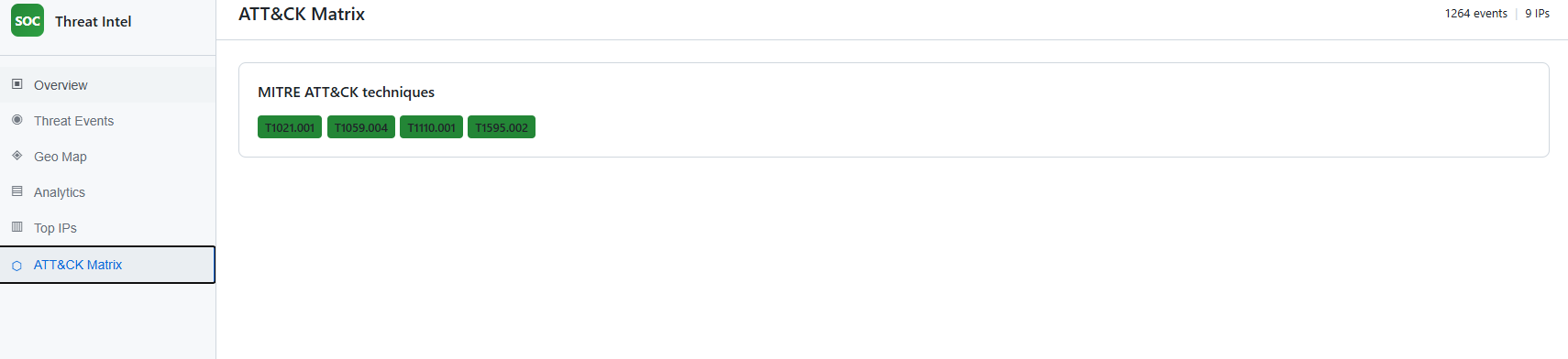
Screenshot: doc/Screenshot 2026-03-08 033133.png (ATT&CK Matrix).
The ATT&CK Matrix tab shows the list of observed MITRE ATT&CK technique IDs (e.g. T1021.001, T1059.004, T1110.001, T1595.002) as badges. This is the direct view of MITRE ATT&CK mapping output: which techniques were inferred from the honeypot events.
honeypot/ (config, filesystem, logger, ssh_handler, telnet_handler, server). Real SSH (Paramiko) on 2222 with persistent host key, interactive shell and virtual filesystem, exec support; Telnet on 2323 with login prompt. Connection logged at accept; queue-based logging for DDoS resilience; logs to data/honeypot_logs.jsonl.attack_mapping/mitre_map.py and map_events.py; export script adds mitre_techniques to events for the dashboard and dataset.dashboard/; loads events.json; shows Overview, Threat Events, Geo Map, Analytics, Top IPs, ATT&CK Matrix.data/; honeypot events with ATT&CK IDs in events.json and source log honeypot_logs.jsonl.ml/train.py; honeypot validation via scripts/simulate_ddos_honeypot.py and dashboard verification.